Repository navigation
Hightlight not work on flutter sdk code #3234
Description

The project code is highlighted, the sdk source code is not highlighted.

project code

flutter sdk source code
Version info
Doctor summary (to see all details, run flutter doctor -v):
[✓] Flutter (Channel unknown, v1.0.0, on Mac OS X 10.14.3 18D109, locale zh-Hans-CN)
[!] Android toolchain - develop for Android devices (Android SDK 28.0.3)
    ! Some Android licenses not accepted.  To resolve this, run: flutter doctor --android-licenses
[!] iOS toolchain - develop for iOS devices (Xcode 10.1)
    ! CocoaPods out of date (1.5.0 is recommended).
        CocoaPods is used to retrieve the iOS platform side's plugin code that responds to your plugin usage on the Dart
        side.
        Without resolving iOS dependencies with CocoaPods, plugins will not work on iOS.
        For more info, see https://flutter.io/platform-plugins
      To upgrade:
        brew upgrade cocoapods
        pod setup
[✓] Android Studio (version 3.3)
    ✗ Flutter plugin not installed; this adds Flutter specific functionality.
    ✗ Dart plugin not installed; this adds Dart specific functionality.
[✓] IntelliJ IDEA Ultimate Edition (version 2018.3.5)
[✓] VS Code (version 1.31.1)
[✓] Connected device (1 available)

! Doctor found issues in 2 categories.
Activity
devoncarew commentedon Mar 1, 2019
Hmm, I see highlighting in both examples in those screenshots. Can you provide a bit more context, or perhaps show a file in the sdk, including a build() method?
alexander-doroshko commentedon Mar 2, 2019
@devoncarew, the 2nd screenshot (scaffold.dart) contains only lexer-level highlighting (it comes from the Dart plugin lexer) but no highlighting from Analysis Server. In the latter case, we'd see references in doc comments (like
[Scaffold]) highlighted.So far I failed to reproduce the issue.
voiddog commentedon Mar 2, 2019
As @alexander-doroshko say, the 2nd screenshot is the source file in sdk
pq commentedon Mar 4, 2019
I'm not able to reproduce either.
@voiddog: is updating your Flutter install an option? I'd be curious if this persists on the latest?
voiddog commentedon Mar 8, 2019
@pq Updating the flutter sdk or intelij idea flutter plugin?
pq commentedon Mar 8, 2019
Sorry @voiddog, I meant you Flutter SDK.
https://flutter.dev/docs/development/tools/sdk/upgrading#upgrading-the-flutter-sdk-and-packages
Thanks for following up!
voiddog commentedon Mar 9, 2019
I try to update my flutter to v1.2.0, but did not work.
Here is my flutter doctor:
I can jump to the defintion by
ctrl+click, but the hightlight not work.voiddog commentedon Apr 2, 2019
Any progress?
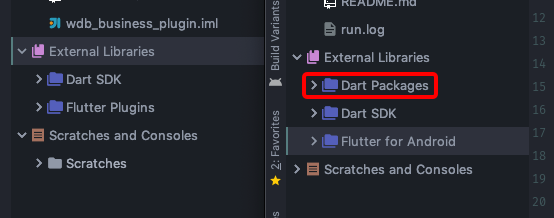
I found some different things below:
voiddog commentedon Apr 2, 2019
The left project is a
flutter plugin, right is aflutter applicationAlexV525 commentedon Feb 22, 2022
This can be only reproduced with
plugin, neitherpackagenorprojecthas the same issue.FYI @pq