
This is a guide for children aged 6 and up.
Just kidding.
This guide only covers the basics.
Since many packagers persist in assembling them incorrectly, I'll give you instructions on how to use appimagetool in the simplest and most correct way possible.
This is an idiot-proof guide. I'll try to explain it in the most basic way possible, and without using overly technical terms.
NOTE: This is not a guide on how to create them! There are specific tools that I'll link to at the end of the guide.
See the index below for reference.
An AppDir is the standard directory layout used to bundle an application and all its required files (binaries, libraries, resources) in one self-contained folder.
You can give it whatever name you want, but in our examples below here we will always use "AppDir".
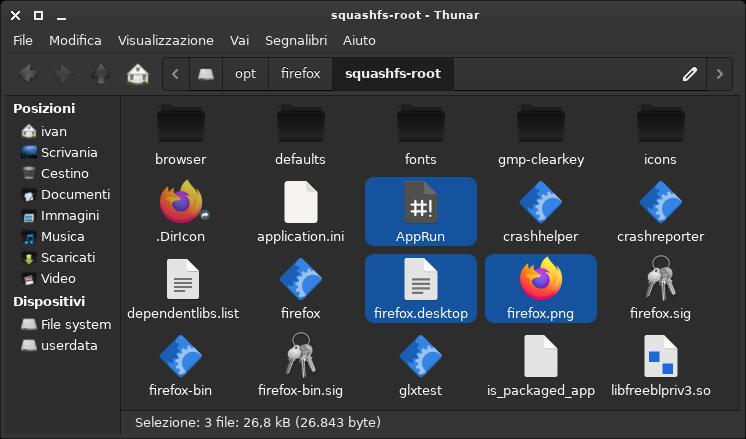
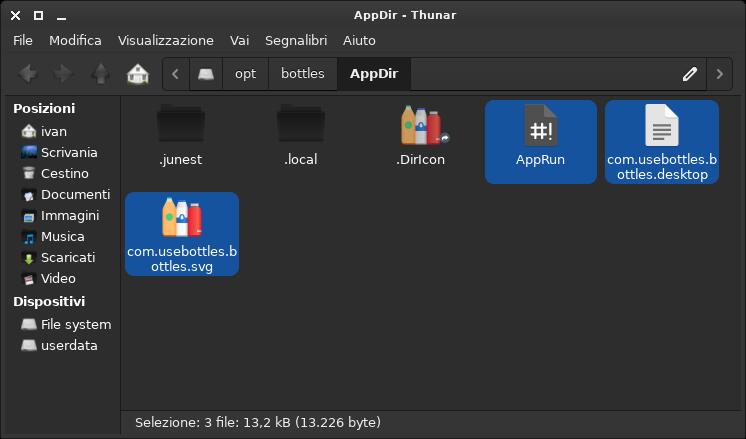
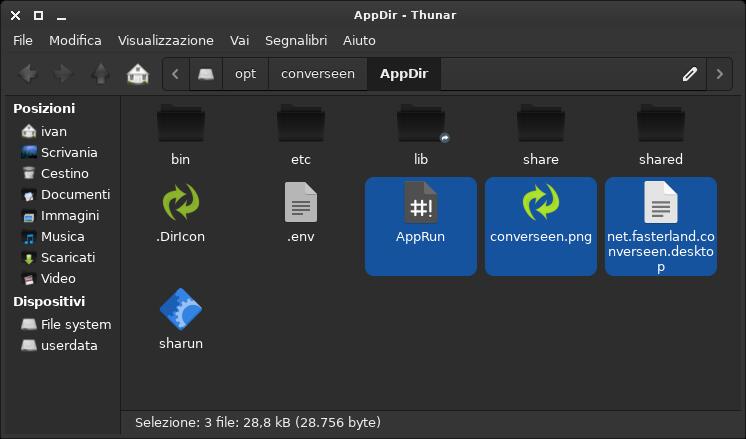
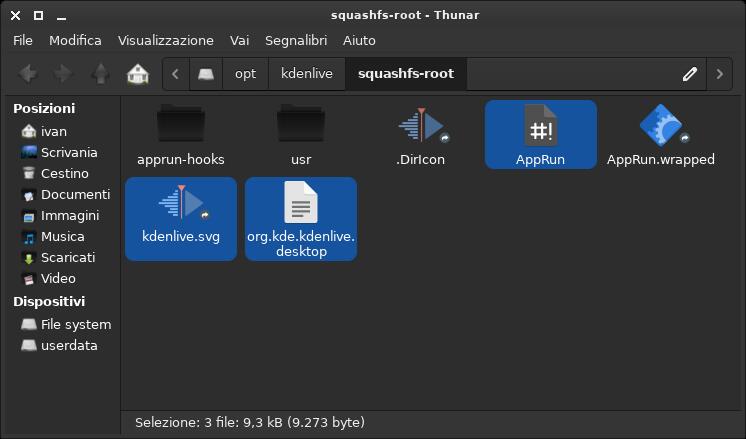
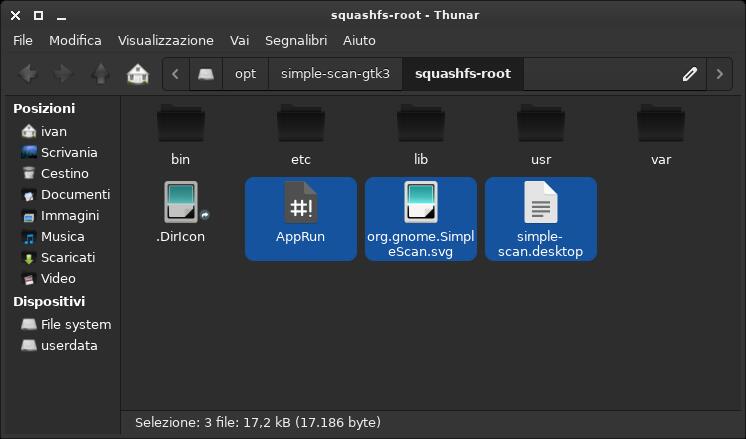
To be valid, a AppDir must contain at least these three essential components in the root directory:
- a valid .desktop file
- an icon (PNG or SVG)
- an AppRun
Depending on the complexity of the program you want to launch, you must include all the files and directories it needs to run.
For example, if you extract multiple .deb packages into a single AppDir, you need the three elements listed above to convert it into an AppImage.
In the screenshots below, some examples of AppDirs
| firefox | bottles | converseen | kdenlive | simple-scan (gtk3) |
|---|---|---|---|---|
 |
 |
 |
 |
 |
AppRun is (in most cases) a shell script.
It consists of:
- a shebang (line 1, for example
#!/bin/shor#!/usr/bin/env bash) - a variable indicating the AppDir directory containing the script (you can name it whatever you like; here we'll simply use "$HERE", like this
HERE="$(cd "${0%/*}" && echo "$PWD")") - one or more commands to launch the program
In this example, let's assume the binary file (in our example its name is SAMPLE) is in the root of the AppDir, close to AppRun. Here's what it looks like:
#!/bin/sh
HERE="$(cd "${0%/*}" && echo "$PWD")"
exec "${HERE}"/SAMPLE "$@"
If the SAMPLE binari is in a subdirectory, for example /usr/bin, the above changes like this:
#!/bin/sh
HERE="$(cd "${0%/*}" && echo "$PWD")"
exec "${HERE}"/usr/bin/SAMPLE "$@"
We can also set PATH to made the AppImage use all binaries under its builtin /usr/bin, like this:
#!/bin/sh
HERE="$(cd "${0%/*}" && echo "$PWD")"
export PATH="{HERE}"/usr/bin:"${PATH}"
exec "${HERE}"/usr/bin/SAMPLE "$@"
Optionally, if it can't read a library from the builtin /usr/lib directory, we can also try to set LD_LIBRARY_PATH, like this:
#!/bin/sh
HERE="$(cd "${0%/*}" && echo "$PWD")"
export PATH="{HERE}"/usr/bin:"${PATH}"
export LD_LIBRARY_PATH="{HERE}"/usr/lib:"${LD_LIBRARY_PATH}"
exec "${HERE}"/usr/bin/SAMPLE "$@"
Yet optionally, if it can't read a file in its builtin /usr/share directory, we can try to set XDG_DATA_DIRS, like this:
#!/bin/sh
HERE="$(cd "${0%/*}" && echo "$PWD")"
export PATH="{HERE}"/usr/bin:"${PATH}"
export LD_LIBRARY_PATH="{HERE}"/usr/lib:"${LD_LIBRARY_PATH}"
export XDG_DATA_DIRS="${HERE}"/usr/share/:"${XDG_DATA_DIRS}"
exec "${HERE}"/usr/bin/SAMPLE "$@"
...and so on.
Use appimagetool, the official one is https://github.com/AppImage/appimagetool
Alternatively, you can use this fork https://github.com/pkgforge-dev/appimagetool
Given the "AppDir", you need to set the architecture (ARCH).
Run the program like this
ARCH=x86_64 ./appimagetool AppDir
You can also specify the name you want to give to your AppImage package, like this
APPNAME="SAMPLE"
VERSION="1.2.3"
ARCH=x86_64 ./appimagetool AppDir "$APPNAME"_"$VERSION"-x86_64.AppImage
You can also add delta updates info (option -u), to made updates quick (using zsync or even better appimageupdatetool).
Let suppose we want add update info for this repository, ivan-hc/AppImage-tips:
APPNAME="SAMPLE"
VERSION="1.2.3"
GITHUB_REPOSITORY_OWNER="ivan-hc"
REPO="AppImage-tips"
TAG="latest"
UPINFO="gh-releases-zsync|$GITHUB_REPOSITORY_OWNER|$REPO|$TAG|*x86_64.AppImage.zsync"
ARCH=x86_64 ./appimagetool -u "$UPINFO" AppDir "$APPNAME"_"$VERSION"-x86_64.AppImage
NOTE, "$GITHUB_REPOSITORY_OWNER" is already set in Github Actions.
If your old AppImage supports the option --appimage-extract, run it with this option to obtain the extracted AppDir (usually its name is "squashfs-root").
Use appimagetool on that directory to obtain a new generation AppImage that runs without libfuse2.
NOTE: if you are looking for a tool that can convert it quickly, see https://github.com/ivan-hc/portable2appimage
DON'T DO IT!
NO! This can be handled at the AppRun level: the script can simply launch processes that detect the presence of these .config or .home directories—and the files to be stored within them.
For instance, you could use mkdir to create a directory named ${APPIMAGE}.home, then copy data from inside the AppImage into it (recommended, with cp) or, if necessary, download or update that data from an online source (with wget, curl or whatever CLI utility you need to download it).
Many emulation apps distribute their AppImage packages as part of an archive that also includes a .home directory; this causes the package size to balloon, forcing users to re-download the entire program rather than relying on delta updates.
Delegating this entirely to AppRun is the best practice.
All you need is a basic knowledge of shell scripting.
There are many tools for building AppImage packages.
This is the ranking of my favorites among the ones I use (from best to least effective):
- Anylinux https://github.com/pkgforge-dev/Anylinux-AppImages - create AppImages that run everywhere
- Archimage https://github.com/ivan-hc/ArchImage - buils AppImages including a minimal Arch Linux (JuNest) container
- AppImaGen https://github.com/ivan-hc/AppImaGen - buld AppImages on a Debian/Ubuntu base (classic)
- Snap2AppImage https://github.com/ivan-hc/Snap2AppImage - try to convert Snap packages to AppImages
I mostly base my AppImages on Archimage and Anylinux, but you can choose the tool that best suits your needs.
| Go back to Index |
|---|