Repository navigation
Automatic Translation using pylivemaker 0.3.2 and Translator++ 2.2 #58
Description

- pylivemaker version: 0.3.2
- Python version: 3.7
- Operating System: Windows 10
- LiveMaker game: Six H games with lots of texts
Description
I came across some games with a huge amount of .lsb that is too tiring to manually translate one by one. So I decided to automate this process.
I don't actually know much about coding. All scripts came from similar solutions online.
What I Did
First, run lmar x game.exe -o files to extract the game.
Second, run the .bat script below to extract texts from all .lsb.
@echo off
set strlsb=lsb
set strcsv=csv

SETLOCAL ENABLEDELAYEDEXPANSION

for /R %%i in (.\*.lsb) do (
    set lsbpath=%%i
    set csvpath=%%i
    set "csvpath=!csvpath:%strlsb%=%strcsv%!"
    lmlsb extractcsv -e utf-8-sig -m lines --overwrite "!lsbpath!" "!csvpath!"
)
Third, open Translator++. New project=>Spreadsheet=>Set to translate all columns=>Select a directory=>select files directory created in step 1=>batch translation=>export to zip=>put all the csv files in zip into a folder (let's say out)

Fourth, run the python script below in game root directory. I used pandas to manipulate csv to transfer translated text from 'Original entry' column in translated csv to 'Translated entry' column in original csv. It also replaced annoying texts that cannot fit into cp932, like "·", or the troublesome \u200b that prevents lines from printing into powershell. It's funny that printing errors lead to unpatched .lsb . I have no idea, I'm just a noob.
from os import listdir
from os.path import isfile, join
import pandas as pd

path_raw = r".\files"
path_tr = r".\out"

raw = [f for f in listdir(path_raw) if f.endswith('.csv')]
tr = [f for f in listdir(path_tr) if f.endswith('csv')]

for i in tr:
    for j in raw:
        if i==j:
            df_raw = pd.read_csv(join(path_raw,j))
            df_tr = pd.read_csv(join(path_tr,i))
            df_tr['Original entry'] = df_tr['Original entry'].str.replace('·','・')
            df_tr['Original entry'] = df_tr['Original entry'].str.replace('\u200b',' ')
            df_raw['Translated entry'] = df_tr['Original entry']
            path = path_raw+'\\'+i
            df_raw.to_csv(path,encoding='utf-8-sig',index=False)
Fifth, run the .bat script below to apply translations from csv to lsb
@echo off
set strlsb=lsb
set strcsv=csv

SETLOCAL ENABLEDELAYEDEXPANSION

for /R %%i in (.\*.lsb) do (
    set lsbpath=%%i
    set csvpath=%%i
    set "csvpath=!csvpath:%strlsb%=%strcsv%!"
    lmlsb insertcsv -e utf-8-sig -m lines "!lsbpath!" "!csvpath!"
)
Finally, run lmpatch game.exe --no-backup -r .\files\ to patch the game.
This is just a temporary solution. I don't know how will pylivemaker behave in the future, but it actually works for me now, so I'm happy with it. I've used these scripts to translate 6 different games in 2 hours. Things are easy now, if you don't mind weird machine translations, lol.
Activity
pmrowla commentedon May 11, 2020
thanks, some other users have been asking about translator++ compatibility in #20 as well. this isn't really something that can go into pylm right now (your solution is windows only) but it's good to know. and we can probably just keep this issue open for any future discussion about translator++ stuff.
akanetr commentedon May 11, 2020
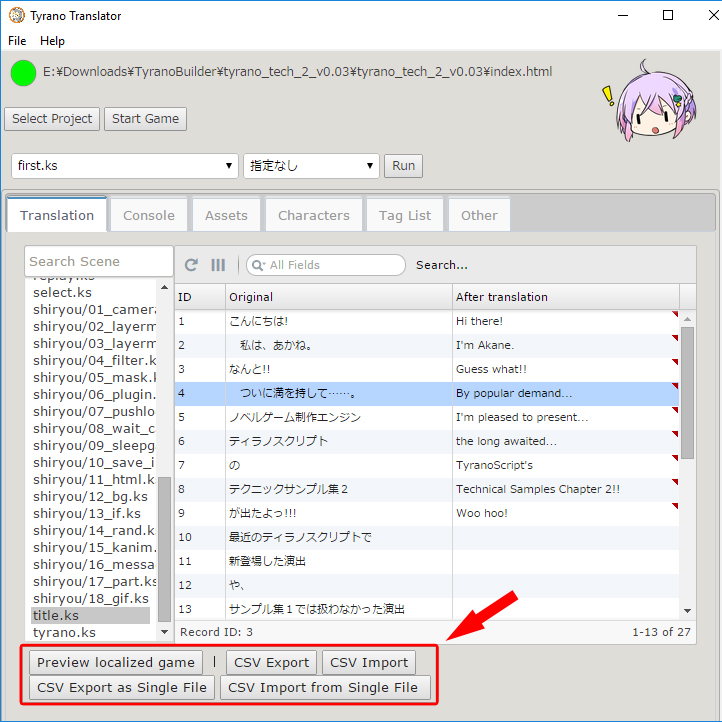
I think if pylivemaker can recursively patch the patched .lsb(s) and other resources into game.exe in lmpatch, it is also possible for extractcsv and importcsv to work recursively. In that case, there's no need for a .bat or .sh script so it can be used on any platform. Below is a screenshot of Tyrano Translator. It can export the raw lines into tab separated UTF-16 BOM for each .ks file and import them back once finished the translation. First column is raw lines and second column is the translated lines. Can similar operations be done to Live Maker games? I don't know. The filename, scenario name and block index really don't mean anything to noob translators like me. Can't we just export the lines in orderly fashion to seperate .csv files with the names of .lsb files on them and insert them back later? I mean, if the text extraction process is linear for .lsb files, we can just insert them back in order. I don't know much about how Live Maker works, maybe things are not that simple, right?
pmrowla commentedon May 11, 2020
livemaker scripts aren't a plaintext format like kirikiri (or tyrano) .ks scripts. They have to be compiled and packed into livemaker's binary LSB format in a very specific way (which is why pylivemaker needs to keep track of things like command and block IDs).
Basically they were not designed to be edited or translated without using the actual livemaker gui with the original livemaker project files.
edit: and yeah you can actually already sort of do batch export/insert by using the
--appendoption to extract everything to a single CSV file.akanetr commentedon May 11, 2020
Emmm, but there's currently no way to batch insert them back from a single CSV file, right? And even with the
--appendoption it still needs a script to find all LSBs then run theextractcsv.pmrowla commentedon May 11, 2020
I'm not sure what the correct .bat syntax would be, but in bash/zsh you can do something like
and it will append everything to the one file
then on insertion you can do
insertcsv will ignore anything from game.csv that doesn't apply to the whatever lsb it is currently trying to patch (since the csv contains the
pylm:...identifiers that tell the CLI tools "this block only applies to this specific lsb file").edit: the identifier stuff only applies to the current master branch (and eventual 1.0 release, see #42 ), but the 0.3.x versions still support reading from a single appended csv using the filename and block number columns
akanetr commentedon May 11, 2020
Wow, I don't know about that before. That makes translations a lot easier.
Thank you!
Stefan311 commentedon May 11, 2020
you should also try the extractmenu and insertmenu functions, who work similar to the csv functions but for menu choices.
Edit: the extractmenu function seems currently broken.
Stefan311 commentedon May 11, 2020
you can merge all csv files together:
Windows (hope I remember right)
copy 0*.csv all.csvor on bash
cat 0*.csv >> all.csvEdit: oh, seems I misunderstand the question. Lesson to be done to me: read before post.
LioMajor commentedon May 19, 2020
I have created a batch menu, so far it looks very promising:
Inserting will use the combined file, so you can translate it in one go.
lmtool.bat.txt
akanetr commentedon Jun 3, 2020
The script works great! Thank you!

One minor issue, in version 0.3.2, "extractmenu and insertmenu commands only support using system locale/encoding when reading and writing CSV files.", so line 163 and 176 won't work.
lams98 commentedon May 28, 2021
hello friend, i know it look a little of a strech to ask but i am using the codes bat that you created a lot and since the Pylivemaker became 1.02 i could not use anymore did you know how to upgrade your bats codes to work,
sorry for my lack of knowledge of bat scripts :)
akanetr commentedon Jun 2, 2021
@lams98
Sorry for my late reply. What error message did you get when using my script?
Also, I think LioMajor's script is way better than mine, did you give that a try?
lams98 commentedon Jun 2, 2021
Sorry, my previous message was kind of vague but I believe the problem is with the new locale/encoding system because of the version 1.03 that I try they simply didn't work.
For example the line
"lmlsb extractcsv -e utf-8-sig -m lines --overwrite "! Lsbpath! " "! Csvpath! "
And I also use the LioMajor script, but yours is better to use together with translator ++
pmrowla commentedon Jun 3, 2021
the
-m linesoption is no longer supported (or needed) in 1.x. If you remove that part from theextractcsvandinsertcsvcommands I think the batch scripts should work?lams98 commentedon Jun 6, 2021
Thanks, I am going to try :)
rymac100 commentedon Jan 23, 2026
the first batch errors out says invalid value for isbpath