Repository navigation
[cli] add lmlsb extractcsv and lmlsb insertcsv commands - #37
Conversation


|
CI failing because blake2 isn't available in py35. Will decide whether or not to just deprecate support for 3.5 later. |
|
@Stefan311 @LioMajor can you test this branch w/your games? I tried it in AGLS and it seems to work. column format has changed a bit, so I'm assuming the google translate script needs to be updated. |

|
The column format is one thing i dislike on the new implementation. The old format was compatible to the menu functions. |
At least for testing, the line counts between the old and new csv's should be the same, so you could just make a script to copy the translated columns from an old csv into a new one (or just copy/paste cells in excel or whatever else). but it does make sense to have consistent columns between the menus and this, I'll take a look at what the menu stuff does |
|
I fear that would not work. Made this: |
|
Ah, I see what you mean now. So you're appending both menus and scenario lines into one csv. I'm honestly not sure that's a use case we really need to support? It doesn't seem like a huge difference to me if users need to use separate (but I can at least see that having the same # of columns, with will have to think about it |
|
Something is wrong with the Scenario name: 000002F5.lsb,000002F5-line2261, いっ、いやぁーーーーーっ!!!, Many line numbers are double. |
|
That's expected now. the row's are just labeled according to the equivalent file they would have originally been extracted to by it may make sense to have columns for edit: and on patching/insert now, the script verifies that the # of lines in the csv for |
|
That's a problem. There are multiple lines in this file. How does the insert decide which one to use? |
it currently assumes that lines in the csv are in the same order they were extracted in by pylivemaker/livemaker/cli/lmlsb.py Lines 1240 to 1248 in 8772bfa if we want it to be stricter, we can add csv columns for the original line char indexes, and original line checksum/digest ( |
Yes. If we just store the index for line out of total line count, we still have the same issue of assuming that count matches before and after. The only "benefit" would be that you could now have lines out of sequence in your CSV. If we use digest or character offsets, we have to take into consideration that they change every time you patch the LSB. If the original jp line has 10 characters, and the new translation has 11, all of the offsets for subsequent characters has now changed. So if we are going to use digest or char offsets, we would need to make sure the user is only patching original LSBs each time, rather than re-patching an already translated and patched LSB, since the CSV would have the digest and char offsets corresponding to the original JP version. |
|
If you use the char-index or checksums you will lose the possibility to re-apply a slightly changed translation. You always have to use the original files. |
Right. But using line counter only gives us protection in the case where the user has lines for a specific file out of order in their CSV (which is not something I think we should support). Using the scenario name as it is now does allow the user to have scripts in any order in their CSV, since they are named by either an actual named So you can append extracted scripts to your csv in any order, but individual lines in those extracted scripts must stay in order. |
Since the file name was also in every line, the lines could be mixed over the whole game. |
yeah removing an entire line from the csv would be a problem. I guess in this case you just need to make sure your translator(s) know not to mess with the csv file structure? |

|
There is still a weakness without full japanese support. When i translated the file i was sure i removed all non ascii conform characters, When extracting the csv again including the japanese space, it looks like this: 00000B6F.lsb,00000B6F-line130," ""Hmm...�@after all", But should look like this 00000B6F.lsb,00000B6F-line130,Hmm... After all, I noticed this later when using notepad++ regular search function
PS: How about using < br > when there are multiple rows? When inserting it back, even a left out or added row wouldn't be a problem, or? |

|
Seems there is a bad encoding somewhere. Original lsb (cp932) -->extract--> Original csv (UTF-8) So the issue is wrong encoding somewhere. The Question is WHERE. To insert or remove line breaks you still have to use the "classic" lns functions. |
|
It would be possible to have support for some tags in CSV, but it's not included w/the current implementation. One of the reasons I ended up with the ideas for #20 (comment) is that it would give you control over line breaks. In cases where you want control over line breaks (which is especially relevant for LM given that message boxes won't nicely word wrap for you), it makes more sense to group text as blocks/paragraphs, rather than by single lines. But I think only supporting basic/minimal text is fine in these csv commands for now |
|
@Stefan311 i'm using shift-jis encoding. Sadly the game i'm translating has so many triggers I guess it's possible to see the @ inside the game since For the time now, i hunted all lsb csv's to remove left @pmrowla to have csv is very convenient to check if there Thanks a ton to add csv support! To have lines in blocks would be the best solution if possible. The other choice is to convert all multiple rows into a single |
|
@pmrowla What encoding does
Seems this is the reason @LioMajor says full japanese system locale is required. @LioMajor the csv file must be saved in the same encoding it is loaded by lmlsb. I am not sure which is the python default one on your system, on mine it is utf-8. |
|
@Stefan311 i started to use notepad++ because it doesn't change the encoding itself and If not using a full japanese system locale, pylivemaker can only extract the csv without Using lns works even on non japanese locale properly in both directions. |
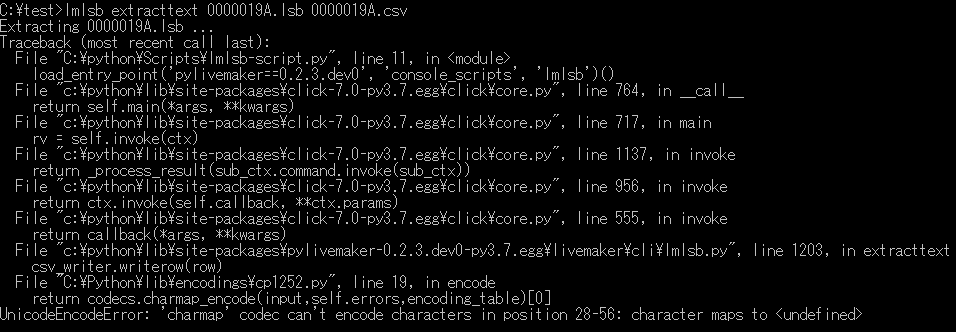
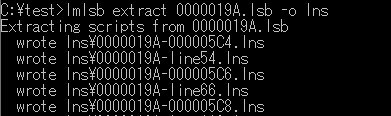
cp1252... Latin... Thats the default encoding on your system. Ok, the encoding parameter is really needed on all file operations to be system independed. |
|
Yeah, we should be specifying an encoding when writing csv files, probably best to default to utf8 but also allow c932, like other pylm tools. I'll push a fix for that. Thinking about the line break issue, since CSV does allow newlines in cells (as long as the data is properly quoted), we could group text in blocks rather than lines. So something like:
@LioMajor @Stefan311 what do you think about this |
|
also, regarding the encoding issue, it's worth nothing that excel doesn't actually read utf-8 CSV files properly. The file encoding has to be utf-8 with BOM ( |
|
So for games like AGLS that don't use manual line breaks at all, extracted blocks will look like and for games that do use manual line breaks, extracted blocks will look like |

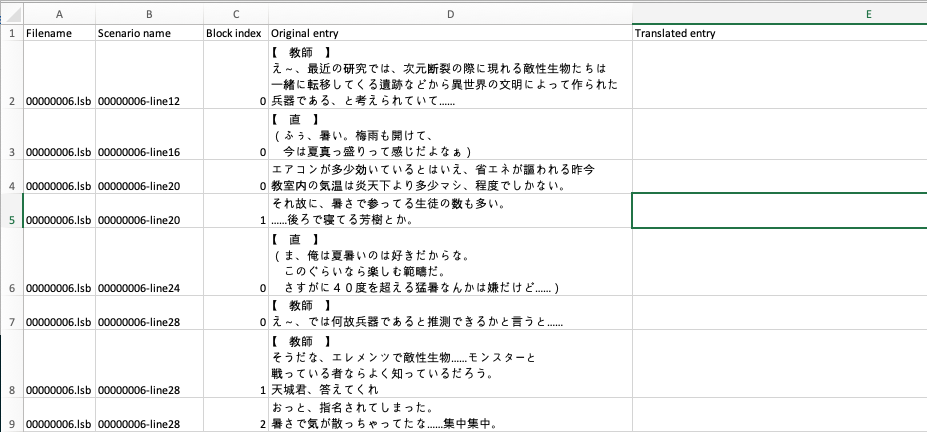
also now if your translator deletes an entire row from the csv (in blocks mode) nothing bad will happen other than the original block being left untranslated in the lsb |
|
One other thing, I think it may be beneficial to have an additional "name" column for games that use images for speaker names, and the A lot of games just put "[speaker]" every 4 text lines (or however tall the message box is for that game), and it will show up in the actual text box, so it is still easy to see what you are translating. But some games (like AGLS) use the actual NAMELABEL system event and images to display speaker name, which will not show up in text blocks. so for the spreadsheet right now just says So when extracting scripts to csv, we should have a column to account for this so translators can actually see who's lines they are translating. I think it's probably ok for a single JP/orig-name only column, and translator can just find/replace the entire column if they want an english or whatever else name to show up in the spreadsheet. We don't really need 2 columns here since the in game event does not get translated (since it refers to image file name). at the api level, text blocks will just need a new |
|
this will break compatibility with menu CSV column count again, but I think in the future menu CSV columns might need to change anyways once the menu stuff is added to the core API for things like #38 |
|
@H0R1Z0N it may be helpful if you have any thoughts on this discussion as well, even though I think you've already finished translating AGLS using lns scripts. I'm sure you must have some ideas on what would have made things easier for you w/AGLS? |

|
Hum, this would be something very useful for someone who was doing it from scratch. Personally, i had the html version, so to resume what i did for a workflow. I used grep to search for the line from the HTML inside the extracted script to know which file had it. Then, i copied the HTML script to a spreadsheet, copied the column to notepad++ in wine, did some automatic replacement so i could simply copy paste a large chunck manually back inside the script and used diffchecker online to verify stuff and used grep 100 time a day. Finally, the mapping command to extract the order was not very practical due to how badly the HTML file was formatted. For the name label stuff, you need to dump the .gal inside the picture folder which's the path it use in those declaration. Dump them to png, edit them, save, open in mspaint (classic one of W7), save to .bmp (Any PNG to BMP online i used kinda failed, you need to reopen those BMP in mspaint and resave those bmp with mspaint. Then use the og tool from livemaker to dump them back to .gal, when done, you recreate the folder structure of where to .gal was, use lmpatch to declare each .gal you edited. Am i missing any other question ? I was kinda finishing the hexedit of the menu. There's a lot of stuff that the lmlsb edit command did not support. So i had to hexedit the stuff and it was a bit of a pain until i reread from A to Z the convo about that one. Now it work. I am using hex to shift-jis or shift-jis to hex to have the jp text back in hexa, then use binwalk -r "\xFF\xFF\xFF\xFF" * where FF's your value in hex to find which file contain what in the menu. Finally, i got a discord bot to ocr the screenshot i take from the game so i can know what the title menu's text was in plain text to be able to convert to hex. |
|
I finally need to mention that some folder in the game dump are sometime prototype text in a poetic way that the author was making before doing the whole game to get an idea of the direction. Mine was the whole folder 00000001 or something. |
|
as far as stuff you still had to hexedit, it’d be good to throw a list in the lmlsb edit discussion issue And yeah there’s already #36 for supporting png to gal conversion in pylm |
|
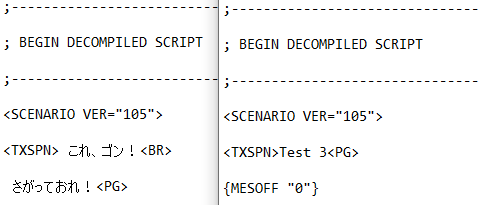
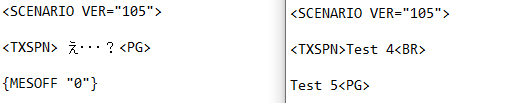
This sounds very nice.
I have tested it and confirmed in lns:
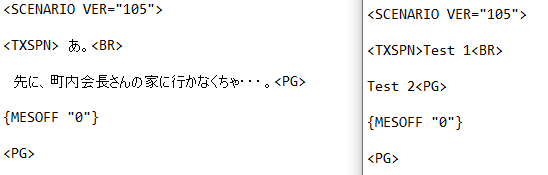
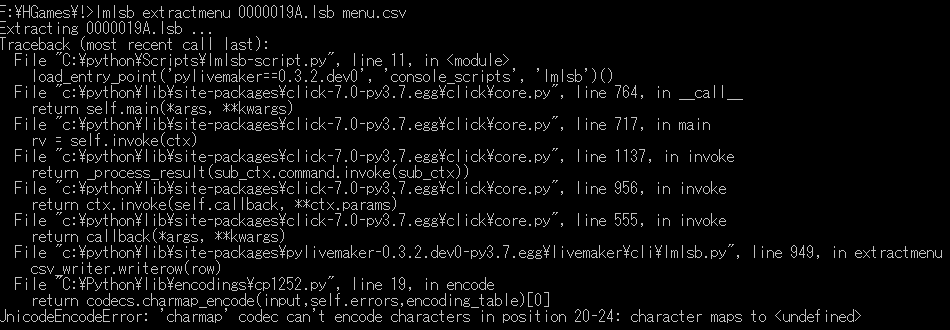
Validated lsb, all scripts passed. Awesome work pmrowla! EDIT: As for excel, it won't work like you showed in #37 (comment) for me. Import looks like: Oh well, i never used excel for this and i feel absolutly fine with notepad++ extractmenu doesn't work on non japanese locale: |


|
To get it to work with excel you have to specify |
|
With regard to the CSV column format, any discussion about it can go here now: #42 |


The export/import file format is similar/compatible to the menu translation format.
Fixes "Stuck Game" bug. I still wonder, how this bug passed the function test.
* TpWord now has `get_lines()` and `replace_lines()` methods
* rename commands to extractcsv/insertcsv
* use new api funcs
* change column format to be more consistent with other pylivemaker
  commands
* block_index column added
* add option for blocks or lines mode

|
This is now available in master (with the old 5-column format). There will be a single pylm release (0.3.2) that will support this column format, so anyone already using that format for menus can continue translating their project. The next release (1.0) will break backwards compatibility for CSVs, so anyone not using the current CSV format yet, should probably wait for that release. |


(probably) replaces #33
extractcsvandinsertcsvxxxx-<name>orxxxx-linenumconvention used inlmlsb extractfor labeling specific scenariosTpWord.get_lines()andTpWord.replace_lines()API methods